✦ TOKI'S HOLLOW
↓ PDF
02 / 13JAVA SETUP

Full Modpack

Fabric modpack with extra visuals, maps, voice chat and quality-of-life features.

What you need
Minecraft Java 26.3 · Fabric Loader · the Full Modpack ZIP. Visual resource packs are optional.
✿ PLEASE READ BEFORE INSTALLINGOPTIONAL EXTRAS

Full Modpack vs. visual add-ons

The Full Modpack is complete by itself. You do not need shaders or resource packs to join. These optional downloads only activate certain visual effects.

RESOURCE PACKS

For extra animations & textures

EMF + ETF
Enable Fresh Animations for animated mobs. FA+ Player adds its matching player visuals.
Fusion
Enable Fusion Connected Glass for connected textures. Compatibility with 26.3 still needs testing.

Without the matching resource packs, these support mods won't show those extra visuals.
SHADERS

For lighting effects

Iris
Shader loader included in the Full Modpack.
BSL
Separate optional shader ZIP to install and enable through Iris.

No BSL shader pack? Iris can stay installed; you just won't see BSL lighting.

NO EXTRA VISUAL DOWNLOADS

These work on their own

AppleSkin · Sodium · Mod Menu · Ping Wheel · Simple Voice Chat · ReplayMod · Freecam · 3D Skin Layers · Xaero’s maps · Female Gender Mod · WorldEdit CUI · Fabric API · Placeholder API

Their normal features do not require any extra resource pack or shader pack.

Want the pretty extras?Install the separate optional packs after your Full Modpack is working.
Get resource packs & shaders
01

Install Minecraft Java 26.3

Install and launch Minecraft Java Edition 26.3 once.

02

Install Fabric Loader

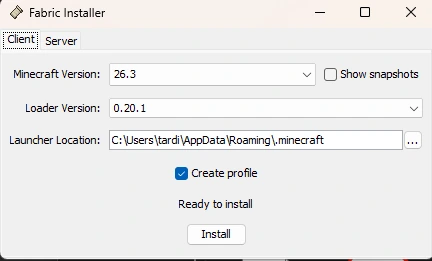
Open the Fabric Client installer, choose Minecraft 26.3, check Create profile, then Install.

Example Fabric installer with the client tab and version selected.
03

Download and extract the Full Modpack ZIP

Download the modpack, then open your Downloads folder. Right-click the downloaded ZIP → Extract All… → Extract. Open the new extracted folder. If it contains a mods folder, open that folder to find the individual .jar files.

04

Copy the mod files into Minecraft (Windows)

In the extracted folder, select the mod .jar files and press Ctrl + C. Press Win + R, paste %appdata%\.minecraft\mods, then press Enter. In the mods folder, press Ctrl + V to paste the JARs. If the folder doesn’t exist, create it.

Important: Do not put the downloaded ZIP or a nested folder into mods. Do not extract the individual .jar files. If using a separate launcher profile/game directory, use that profile’s mods folder instead.

05

Launch Fabric 26.3

Choose your new Fabric profile in Minecraft Launcher and start the game.

06

Join the server

Multiplayer → Add Server → enter tokishollow.fun. Save and Join.

Optional finishing touches
Visit Resource packs & shaders → for Fresh Animations, connected glass and BSL shaders.